Showing posts with label Widget. Show all posts

Cara Membuat Popular Post Dengan Animasi

Bismillah Alhamdulillah pada kesempatan ini tepatnya di bulan ramadhan tanggal tujuh belas kurang lebih sekitar jam berapa yah jadi lupa deh. he he .. yah itung itung nungguin wakto sore (nga buburit) bloger widget ingin sharing sedikit tentang  Cara Membuat Popular Post Dengan Animasi...contohnya seperti tampilan di side bar blog ini.
sekarang langsung saja ke tutorial cara membuat  popular post 
Cara Membuat Popular Post Dengan Animasi
Popular Post dengan Animasi
langkah pertama seperti biasa anda Add a Gadget dan pilih popular post yang telah di sediakan oleh blogger  dan jangan lupa set tampilan / display post harus lebih dari 4 post
new Popular post blogger
script popular post
 
Nah setelah anda add dan set popular post anda tambahin lagi  gadget HTML/Javascript caranya add Gadget dan pilih HTML/JavaScript
Setelah terbuka form nya anda ini dengan secript di bawah ini
<style type="text/css" media="screen">

#PopularPosts1 {
 overflow:hidden;
margin-top:5px;
padding:0px 0px;
height:400px;

}

#PopularPosts1 ul {
width:220px;
overflow:hidden;
list-style-type: none;
padding: 0px 0px;
margin:0px 0px;
}

#PopularPosts1 li {
 width:208px;
padding: 5px 5px;
margin:0px 0px 5px 0px;
list-style-type:none;
float:none;
height:80px;
overflow: hidden;
background:#fff url(http://i879.photobucket.com/albums/ab351/bloggerblogimage/blogger/post.jpg) repeat-x;
border:1px solid #ddd;
}

#PopularPosts1 li .item-title {
    color:#A5A9AB;
    font-size:1em;
    margin-bottom:0.5em;
}

#PopularPosts1 li .item-title a {
 text-decoration:none;
color:#4B545B;
font-size:11px;
height:18px;
overflow:hidden;
margin:0px 0px;
padding:0px 0px 2px 0px;
}

#PopularPosts1 li img {
 float:left;
margin-right:5px;
background:#EFEFEF;
border:0;
}

#PopularPosts1 li .item-snippet {
  overflow:hidden;
font-family:Tahoma,Arial,verdana, sans-serif;
font-size:10px;
color:#262B2F;
padding:0px 0px;
margin:0px 0px;
}

#PopularPosts1 .item-snippet a,
#PopularPosts1 .item-snippet a:visited {
    color:#3E4548;
    text-decoration: none;
}

#PopularPosts1 .spyWrapper {
    height: 100%;
    overflow: hidden;
    position: relative;
}

#PopularPosts1 {
	-webkit-border-radius: 5px;
	-moz-border-radius: 5px;
}

.tags span,
.tags a {
	-webkit-border-radius: 8px;
	-moz-border-radius: 8px;
}

a img {
    border: 0;
}

-->
</style>
<script src="http://ajax.googleapis.com/ajax/libs/jquery/1.6.2/jquery.min.js" type="text/javascript"></script>
<script type="text/javascript" charset="utf-8">
$(function () {
    $('.popular-posts ul').simpleSpy();
});
</script>
<script src="http://accordion-for-blogger.googlecode.com/svn/trunk/simplespy.js" type="text/javascript"></script>
Dan hasilnya seperti di bwah ini  terus anda simpan dan jangan lupa letaknya harus tepat dia atas widget Popular Post yang anda tadi buat
Posisi Script dan Popular Post
Posisi Script dan Popular Post... nah mungkin itu yang saya dapat sampaikan pada kesempatan ini semoga bermanfaat dan semangat terus di duia blogger .....

Menyisipkan Twitter Melayang Di Blogspot

Twitter Adalah sebuah sebuah social networking yang lagi populer pada saat ini. mungkin para neter sudah tau apa pungsi dan apa itu twitter?? saya tidak akan mebahas apa itu Social Networking? apa itu Twitter? dan apalagi membahas apa itu Facebook he he. krna masalah itu sudah banyak meraka yang bahas di internet silahkan aja anda cari di search engine terbaik kalian.. he he

Sekarang saya akan membahas bagaimana cara menyisipkan widget twitter yang melayang layang mengikuti pointer (petunjuk Mouse). anda lihat burung yang terbang mengikuti pointer anda disini?? nah seperti itulah contohnya.. jika anda tertarik dengan yang demikian mari kita lanjutkan dan jangan kemana tetep manteng di blogger widget.
Twitter Palying On Blogspot

Cara menyisipkan burung (entah apa itu lah pokonya burung twitter aja biar gampang nyebutnya he he) twitter di halaman blog anda mudah sekali anda cukup mengikuti langkah langkah di bawah ini :
  • Pertama anda login ke blogger
  • Kedua anda pilih blog yang akan di sisipkan burung Twit
  • Setelah itu anda anda add Gadget dan Pilih HTML/Java Script
  • Nah setelah kebuka dan kosong.. anda sisipkan sedikit code code di bawah ini (itung itung mengisi ke kosongan he he)

<div class='widget-content'>
<script type="text/javascript" src="http://feflex.googlecode.com/files/Twiiter.js"></script>
<script type="text/javascript">
var birdSprite="https://blogger.googleusercontent.com/img/b/R29vZ2xl/AVvXsEgfJj992K8s9nkFz9ZfHB6FMcBYmFbA8HOiWZnE1VAwqi6k0P39LoY8I-i8Zne3m6lreGaYDE-aNrM7TBgKSfltogixQRYrfE_SBgPpt1ba5YvvEFBaVahmVOY4BKd5MUtty7PAK_ZJPHw/"; var targetElems=new Array("img","hr","table","td","div","input","textarea","button","select","ul","ol","li","h1","h2","h3","h4","p","code","object","a","b","strong","span"); var twitterAccount = "http://twitter.com/#!/mukri";var tweetThisText = "http://twitter.com/#!/mukri";tripleflapInit();
</script>
</div>

Cara Membuat Whos Amung Di Blospot

Bagaimana cara mengetahui stat di blog/web kita ?? nah itu yang menjadi pertanyaan di benak blogger widget. oke langsung saja rekan rekan tau ga whos amung... ?? jika belum tau saya beri tau sedikit tentang whos amung stat...
Whos amung merupakan salah satu gadget untuk mengetahui stat seberapa banyak orang yang lagi nongol atau online di blog/website kita dan pada artikel mana saja mereka online. he he itu kalo tidak salah. sebenarnya bukan whos amung saja yang menyediakan pasilitas ini di internet masih banya lagi yang lebih populer silhkan anda cari di google.
oke langsung saja untuk memasang widget whos amung pada blog kita anda tinggal kunjungi saja web site nya di alamat http://whos.amung.us/ atau anda tinggal kilik link ini.
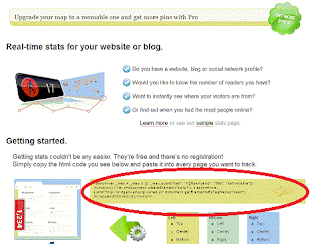
nah setelah anda sampai pada target  anda tinggal copy script seperti di bawah

<script id="_wauubr">var _wau = _wau || []; _wau.push(["small", "gu8uawu4iko5", "ubr"]);(function() { var s=document.createElement("script"); s.async=true; s.src="http://widgets.amung.us/small.js";document.getElementsByTagName("head")[0].appendChild(s);})();</script>
letaknya tidak jauh biasanya adan di bawah lihat gambanya deh..... di gambar ada letak script whos amung
Gambar Letak Script Whos Amung
Gampangkan rekan rekan tinggal copy paste saja scripnya dan letakan pada blog anda biar mudah anda simpan saja script tersebut di HTML/Java Script .
jika tampilan nya ingin menarik anda tingal pilih widget yang di sediakn oleh whos amung caranya anda lihat ke bawah sedikit (lihat tanda merah di gambar ) dari scrip tersebut terus anda clik showcase nanti akan tampil seperti gambar di bawah

whos amung stat
widget whos amung
  
Di sana ada beberpa pilihan diantaranya pilihan blck itu tampilan seperti dault nya, terus Color me itu anda bisa mengatur warna sesuia dengan warna yang anda sukai, terus ada juga yang berbentuk Map namun harus di ingat itu fasilitas yang di berikan whos amung yang bersipat Free untuk yang pro masih lagi banya Fitur fitunya. udah dulu ah moga artikel cara membuat whos amung ini bermanpat. maklum masih belajar dala dunia blogger 

How To Add Automatically Link To This Post Widget To Blogger

 Do you like to add "Link To This Post Widget" under your blog post?This will help you to increase your site's backlinks for better SEO.So if you interested to add this useful widget to your blogspot blog follow the simple steps below.

1.Log in to your dashboard--> layout- -> Edit HTML

2.Click on "Expand Widget Templates"

3.Scroll down to where you see this:
<data:post.body/>

Two Latest Gadgets From Blogger

Bismillah Alhamdulillah,been so long I do not see a blogger, and has long also I do not update this blog, due to the busyness and activity that can not be left behind.
recently okay bloggers out new features, maybe this info is stale, but for me, this info may be worth for beginner bloggers.

How to Display The Recent Post By Category

Bismillah (In The Name of Allah),On this occasion I will write about how showing recent post based on category labels, may be peer to peer bloggers have often seen that displays recent blog post based on category labels.

Based on recent post How to display the label is not difficult, rather than pushes to and fro, we straight to the tutorial course, do as follows.
  • The first step you log into blogger.
  • After that you click on design continues to look for a place to store these widgets
  • Clik your selajutnya step gadget ad, then select RSS Feeds.
  • The last step you input the code below
  • The preview image if it is not clear

How to Insert Share Buttons On Blogspot

How to Insert Share Buttons On blogspot
Bismillah (In The Name of Allah),in this tutorial, I'll mambahas about the latest features of the bloggers on the Share button. 

Share Button is one way to spread easily on the blog so that people know well in social media or the other,

Now a blogger / blogspot provides the facility to add the share button on posts. Just how to enter the share button in the post without using scripts. usual first step you log into your blogger thereafter Clik design, see picture below

How to Create A Site Map On Blogspot

Bismillah (In The Name of Allah), To create a sitemap in blogspot is very easy, you just create a new posting on the blog entry directly below the javascript code,

Or you can also use the blogspot page, prior to the javascript code you see first image below sitemap
How to Create A Site Map On Blogspot
now to create your sitemap copy code below

Create Animated Banner In Online

Bismillah (In The Name of Allah),In order for our blog appear more attractive and dynamic, one way is by displaying banners with banner animasi.because animation, the eye of the visitor will be instantly drawn to the banner, especially if you are a businessman, would be more effective animated banners for advertising that we put on appeal with the usual banners. How to create an animated banner is so easy, like a free there, willing to pay also, but course there are advantages and disadvantages.

How to Create a Slide Panel On Blogger

Bismillah (In The Name of Allah), Tutorial blog at this time I'll try to slide the panel on blogger using JQuery, I am interested in doing this when I was looking for tutorials Javascript Query Or in terms of popularity is often called JQuery. just okay to do. For Example Slide JQuery Clik Here

How to Create Tabbed Widget In Blogger

Bismillah (In The Name of Allah) , How to create tab widget I got from this blog there a lot Abu Farhan tutorial how to hack blogger, and I wrote back on my blog, this tutorial can be found on the title of the posting bloggertuts his The Easiest Way to Make Tabbed Sidebars on Blogger. when I read the article bloggertuts, to make the sidebar tabbed he got the idea from webitect titled Create a Graceful jQuery Tabbed Widgets in 5 Easy Steps, okay than I discuss here there we'd better go straight to the tutorial

Add Google Buzz Button To Blogger

Add Google Buzz Button To Blogger
How to add a button to buzz in blogger / blogspot
  • The first step you log into blogger
  • Continue to click on the layout and click edit HTML

Create Twitter Widgets And Buttons In Twitter Goodies

Create Twitter Widgets And Buttons In Twitter Goodies
In this tutorial, I tried to write how to create a twitter widget and the button I create this widget has a lot of bloggers are discussing it, but it never hurts to rewrite my reply back about this. just okay

Web Site Photo Editing Online

Website online photo editing this is the talk of this time, a lot of sites that provide facilities to edit pictures and videos online, you live there your picture input and automatically your pictures will be funny, background images already provided you live in accordance with the wishes memelih you, ok just among the online website that provides video editing include:

How To Insert a Service Ping In Your Blog

My Ping in TotalPing.comFree ping Servis With Total Ping dot com
  • First Go to Totolaping.com
  • Next Step Insert Yuor Blog Title And rss 
  • And Go Ping 
  • After Ping Clik Widget and chose style for your blog 
  • Next Log in to blogger  click layout   
  • Next Add Gadget and Clik htm/javascript 
  • Last Step Copy Html Code from totalping.com  

Add Alexa Widget To Blog/Website

After a few days backs post about Tips And Trick Increasing Alexa Rank now I will post how to insert a widget alexa, ok go directly to the scene,
how to insert a widget alexa
  • Go to alexa.com
  • Continue clik for site owner
  • There lots of choices among Get Traffic Widgets, Widgets Get Reviews, Get Alexa Logos
  • For stat own website you select Get Traffic Widgets kept you choose which suits you. continue to address blog / website and clik we build widgets

How To Make Block all Text

This is not the hard way, how to make all blocks is very interesting text and visitors do not need block said they need the word, let alone a reply you wkkkk copy paster, ok go directly to the tutorial just let me no splint rese bush and not your usual login the bloggers and and this widget is usually stored in the sidebar usually for the exchange of links
First you must first create one text area to insert the word / text that will be on the block if you do not know how to make this text area script ok to mebuat text area you can click here setting of this text area at your convenience cols = "20" means that while the text area high rows = "10" width of text area

How to Make a Tag Cloud Version Blogspot

Tag cloud is very good and very style especially when the flash animation complete if it has not had a blog if you do not have a tag cloud, now no longer ribet tag cloud to make you stay right clik ok so directly to the way it'll not beat around.

How To Make a Related Post on Blogspot

How To Make a Related Post on Blogspot blogger logo
Prior to step tutorial how to make a related post I should first explain what it is related post, ok maybe if you are a long-known bloggers would you already know what he meant, I only had it for peer review colleagues who know and know not related post, ok related post is usually related articles based on Category, it is basic and seo techniques and the bloggers had already been tau function and usefulness. than I am mending strings attached directly to the scene.


Contac

Stat

My Ping in TotalPing.com Free 1000 Backlinks

Community

Design by Free Wordpress Themes | Bloggerized by Lasantha - Premium Blogger Templates