MA NURUL HUDA

Bagaimana cara mengetahui stat di blog/web kita ?? nah itu yang menjadi pertanyaan di benak blogger widget. oke langsung saja rekan rekan tau ga whos amung... ?? jika belum tau saya beri tau sedikit tentang whos amung stat...
Whos amung merupakan salah satu gadget untuk mengetahui stat seberapa banyak orang yang lagi nongol atau online di blog/website kita dan pada artikel mana saja mereka online. he he itu kalo tidak salah. sebenarnya bukan whos amung saja yang menyediakan pasilitas ini di internet masih banya lagi yang lebih populer silhkan anda cari di google.
oke langsung saja untuk memasang widget whos amung pada blog kita anda tinggal kunjungi saja web site nya di alamat http://whos.amung.us/ atau anda tinggal kilik link ini.
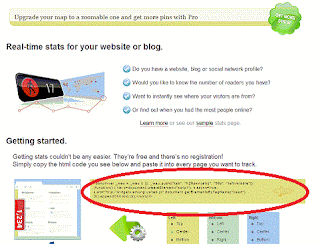
nah setelah anda sampai pada target anda tinggal copy script seperti di bawah

Whos amung merupakan salah satu gadget untuk mengetahui stat seberapa banyak orang yang lagi nongol atau online di blog/website kita dan pada artikel mana saja mereka online. he he itu kalo tidak salah. sebenarnya bukan whos amung saja yang menyediakan pasilitas ini di internet masih banya lagi yang lebih populer silhkan anda cari di google.
oke langsung saja untuk memasang widget whos amung pada blog kita anda tinggal kunjungi saja web site nya di alamat http://whos.amung.us/ atau anda tinggal kilik link ini.
nah setelah anda sampai pada target anda tinggal copy script seperti di bawah
<script id="_wauubr">var _wau = _wau || []; _wau.push(["small", "gu8uawu4iko5", "ubr"]);(function() { var s=document.createElement("script"); s.async=true; s.src="http://widgets.amung.us/small.js";document.getElementsByTagName("head")[0].appendChild(s);})();</script>letaknya tidak jauh biasanya adan di bawah lihat gambanya deh..... di gambar ada letak script whos amung
Gambar Letak Script Whos Amung
Gampangkan rekan rekan tinggal copy paste saja scripnya dan letakan pada blog anda biar mudah anda simpan saja script tersebut di HTML/Java Script .
jika tampilan nya ingin menarik anda tingal pilih widget yang di sediakn oleh whos amung caranya anda lihat ke bawah sedikit (lihat tanda merah di gambar ) dari scrip tersebut terus anda clik showcase nanti akan tampil seperti gambar di bawah
 |
| widget whos amung |

Di sana ada beberpa pilihan diantaranya pilihan blck itu tampilan seperti dault nya, terus Color me itu anda bisa mengatur warna sesuia dengan warna yang anda sukai, terus ada juga yang berbentuk Map namun harus di ingat itu fasilitas yang di berikan whos amung yang bersipat Free untuk yang pro masih lagi banya Fitur fitunya. udah dulu ah moga artikel cara membuat whos amung ini bermanpat. maklum masih belajar dala dunia blogger
 Posted in: